Free bandwidth tester
Speedtest by Ookla is a full-featured iteration for internet and network speed. Its hefty set of utilities and tools picks up a nearby server to run a full test. It returns information on your upload and download speed, latency and packet loss. This useful piece of information is presented to you from a long list of remote test servers. The result comes out can be easily understood because of the app’s sleek interface and comprehensive statistical tools. Ookla has made this possible by amassing an impressive database of its users’ connection information. This can be viewed on Ookla’s NetIndex site.
Top Recommended Alternative

World-class technology
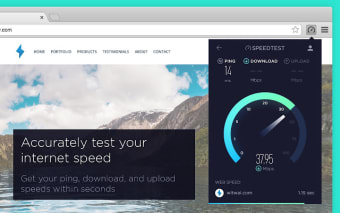
Speedest is powered by Ookla, a distributor of bandwidth testing technology. So, you will see that Speedtest has an organized and functional website. It comes with a speedometer display and other dials and readouts. These show the different factors that make up your internet’s speed (or lack thereof). This is made possible by the thousands of remote testing servers organized by Ookla. The server closest to you will make it easy to decide on and even change test locations based on your location.
Inclusive of all user-levels
On top of its minimalist aesthetic and a massive number of testing sites, Speedtest is known to save the results of each of its users’ tests. The data gathered will be filtered over time to identify the best-performing internet providers. The best networks are identified through the server or IP address it uses. You can also use Speedtest to compare your internet speed over time.
Using your Speedtest account will allow you to see the results of your previous tests. This will be useful in tracking the speed of your WiFi connection. You can show this information to your internet service provider; you can show your ISP that your connection has slowed down or prove that the upgrade to your bandwidth actually works.
You will see the final results of your test on the top of the pedometers. These results can be downloaded and then shared. There are a number of ways you can share your results. You can share it via email to your internet service providers, your social media platforms or instant messaging app to share with friends.